Posts

Image
  Design Patterns in C# In C#, design patterns are reusable, proven approaches to solving common software-design and architecture problems. They are not libraries, frameworks, or fixed code templates. Instead, they provide guidelines for organizing classes, objects, and responsibilities so that applications become maintainable, scalable, flexible, testable, and easier to extend . Design patterns are especially useful in enterprise applications built using C#, .NET, ASP.NET Core, Web API, Entity Framework Core, Angular, and microservices . Why Use Design Patterns? Design patterns help developers: Reduce code duplication. Improve code maintainability. Follow SOLID principles . Reduce tight coupling between components. Improve code reusability. Make applications easier to test. Make new features easier to add. Provide a common vocabulary between developers. Improve separation of concerns. Make complex applications easier to understand. Support scalable and extensible architectures. R...
Create class and create 5 instances and get count of how many instances of one class are created

 // Online C# Editor for free // Write, Edit and Run your C# code using C# Online Compiler using System; public class HelloWorld {     public static void Main(string[] args)     {         // Create 5 instances of Employee class             Instance instances1 = new Instance();             Instance instances2 = new Instance();             Instance instances3 = new Instance();             Instance instances4 = new Instance();             Instance instances5 = new Instance();            // Get and display instance count             Console.WriteLine("Total Employee instances created: " + Instance.GetInstanceCount());             Console.ReadLine();             } }  ...

Difference between Method overloading and method overriding with example

  Method Overloading vs Method Overriding in C# Method Overloading — Definition: Method Overloading is a feature in C# where multiple methods can have the same name within the same class but with different parameter lists (different type, number, or order of parameters). It is also known as: Compile Time Polymorphism Static Polymorphism Early Binding Method Overriding — Definition: Method Overriding is a feature in C# where a method in a derived (child) class provides a specific implementation of a method that is already defined in its base (parent) class. It requires the use of: virtual keyword in the base class method override keyword in the derived class method It is also known as: Runtime Polymorphism Dynamic Polymorphism Late Binding   Feature Method Overloading Method Overriding Concept Same method name, but different parameters (compile-time polymorphism) Same method name, same parameters, but different implementation in derived...
let's explain object-oriented programming (OOP) concepts: 1. **Classes and Objects:**    - Imagine a class as a blueprint or template for creating objects. For example, think of a class called "Car" that describes what a car is, such as its color, brand, and model.    - Now, an object is like a specific instance created from that blueprint. So, if you have a class "Car", you can create objects like "MyCar", "YourCar", each with their own unique characteristics. 2. **Encapsulation:**    - Encapsulation is like putting things in a box and only allowing access through certain ways. In OOP, it means bundling data (variables) and methods (functions) that work on the data together within a class.    - For example, in our "Car" class, we might have variables like "color" and "model", and methods like "startEngine()" and "stopEngine()". These are encapsulated within the "Car" class. 3. **Inh...

multi color initial(Avatars) if img not available in Angular it's work angular 2,4+ all versions

Image
Today I will show two methods apply background-color in initial Method 1: here I will show dynamic colors using random calls step 1: create a component and define color array list in .ts file public circleColor: string; colors = [ '#6930c3 ', // French Violet '#0096c7', // Blue green '#FFFF5C', // Laser lemon '#FF3366', // Radical red '#F49F0A', // Tagrine '#25a550', // Green '#03312E', // Rich black ]; step 2: ngOnInit() { const randomIndex = Math.floor(Math.random() * Math.floor(this.colors.length)); this.circleColor = this.colors[randomIndex]; } step 3: In .html <div class="circle" [ngStyle]="{'background-color': circleColor }"> // change color // <img *ngIf="!showInitials && showComponent" src="{{photoUrl}}" onerror="showInitials " class="initials">{{ initials }} ...

Refresh an Angular Component without reloading the same Component

Image
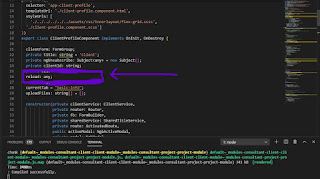
A short trick for refreshing data in the same Angular components. This snippet will work in Angular 2, 4, 5, 6, 7, 8, and 9. Here two method and  you can add according to your needs you are working with Angular and need to refresh a component without navigation on another component without  using   window.location.reload()    or   location.reload() ,  you can use the following code in your project: 1. using constructor in the same page(component) reload: any; Then, add this code to the required component's constructor . this . router . routeReuseStrategy . shouldReuseRoute = function () { return false ; }; this . mySubscription = this . router . events . subscribe (( event ) => { if ( event instanceof NavigationEnd ) { // Trick the Router into believing it's last link wasn't previously loaded this . router . navigated = false ;   } }); Make sure to ...

Basic git commands for every developers should know

If you're one of those developers who still don't use any version control system, I don't know how you're still managing to get all your work done. so now here I am providing some git commands and you can use also increase your knowledge and work proficiency. 1) git config Notes:  To set your user name and email in the main configuration file. How to use git commands:  To check your name and email type in  git config --global user.name  and  git config --global user.email . And to set your new email or name  git config --global user.name = “Bhuwan Paneru  and  git config --global user.email = “ bhuwanpaneru@yahoo.com ” 2) git init Notes:  To initialise a git repository for a new or existing project. How to   use git commands:   git init  in the root of your project directory. 3) git clone Notes:  To copy a git repository from a remote source, it also sets the remote to the original source so that you can...